PowerShellでCoinExchange.ioのgetmarketsummaries APIにアクセスしてみる †
CoinExchange.io
のgetmarketsummaries APIをPowerShellで呼び出す方法の記事になります。
CoinExchange.io
へのリンク

追記 †
関連資料・記事 †
getmarketsummariesの仕様 †
以下、CoinExchange.io API v1 Referenceのgetmarketsummaries APIの抜粋です。
Get Market Summaries

This endpoint retrieves summaries for all markets.

HTTP Request
GET https://www.coinexchange.io/api/v1/getmarketsummaries
'getmarketsummaries' returns JSON structured like this:

{
   "success": "1",
   "request": "/api/v1/public/getmarketsummaries",
   "message": "",
   "result": [
   {
       "MarketID": "1",
       "LastPrice": "0.00902321",
       "Change": "2.01",
       "HighPrice": "0.00961681",
       "LowPrice": "0.00853751",
       "Volume": "3043.78746852",
       "BTCVolume": "3043.78746852",
       "TradeCount": "1332",
       "BidPrice": "0.00902321",
       "AskPrice": "0.00928729",
       "BuyOrderCount": "7796",
       "SellOrderCount": "7671"
   },
   {
       "MarketID": "3",
       "LastPrice": "0.05000000",
       "Change": "0.00",
       "HighPrice": "0.00000000",
       "LowPrice": "0.00000000",
       "Volume": "0.00000000",
       "BTCVolume": "0.00000000",
       "TradeCount": "0",
       "BidPrice": "0.00000000",
       "AskPrice": "0.02000000",
       "BuyOrderCount": "0",
       "SellOrderCount": "1"
   }
   ]
}
getmarketsummaries APIをブラウザでアクセスしてみる †
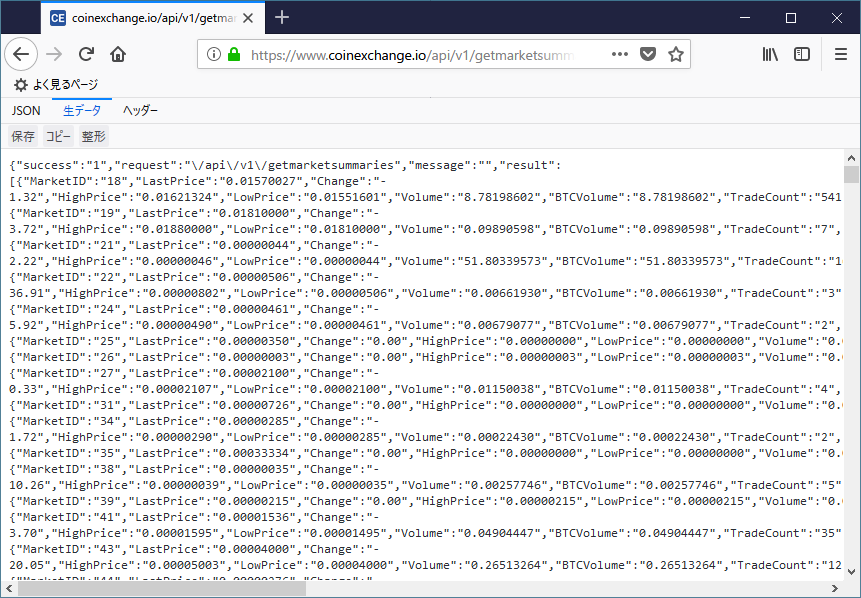
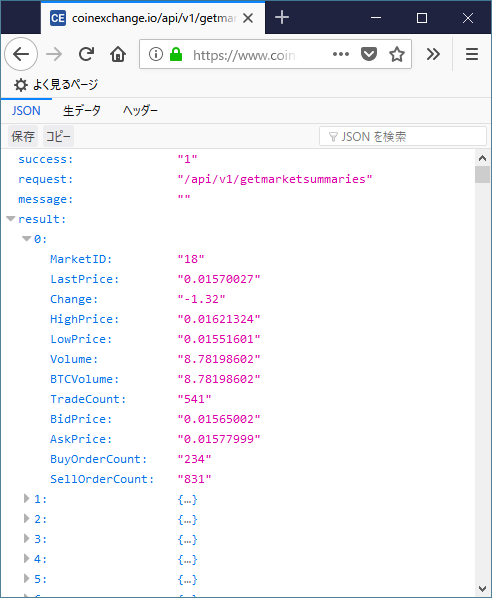
以下のURLにブラウザでアクセスしてみます。
FirefoxだとJSON形式で確認することができます。
| JSON | 生データ |
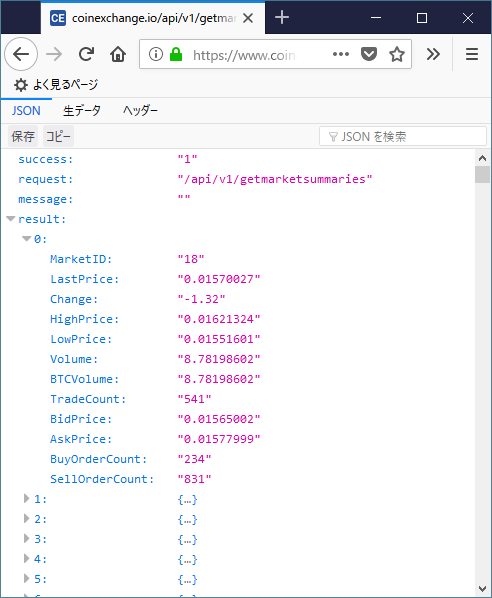 | 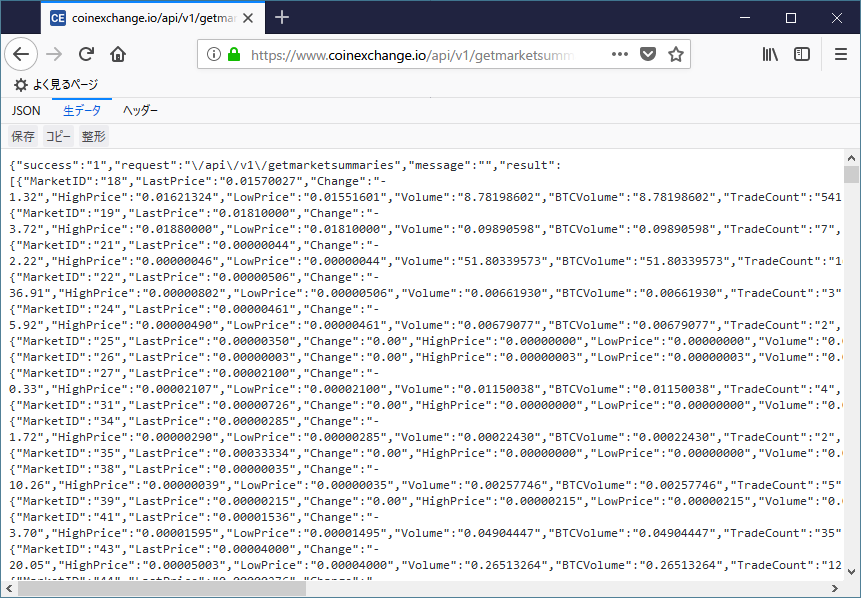 |
PowerShellのInvoke-RestMethodを使用してAPIを呼び出してみる †
実際に、CoinExchange.io
のgetmarketsummariesをInvoke-RestMethodコマンドレットを使用して呼び出してみます。
- セキュリティプロトコルをTLS1.2に変更します。(2018/5/31時点、TLS1.2を指定しないと動作しなくなったので追記)
PS C:\> [Net.ServicePointManager]::SecurityProtocol = [Net.SecurityProtocolType]::Tls12
- 呼び出し元のURL情報を各変数に設定しています。
PS C:\> $base_url = "https://www.coinexchange.io/api/"
PS C:\> $version  = "v1"
PS C:\> $method   = "getmarketsummaries"
- getmarketsummaries APIのURLをInvoke-RestMethodの引数にして実行します。
PS C:\> $response = Invoke-RestMethod -UseBasicParsing "${base_url}${version}/${method}"
- getmarketsから返却された値を表示しています。
PS C:\> $response

success request                    message result
------- -------                    ------- ------
1       /api/v1/getmarketsummaries         {@{MarketID=18; LastPrice=0.01584000; Change=0.32; HighPrice=0.01599963; ...
取得した値から各種値を抽出する †
上記で取得し、$responseに格納した値を操作してみます。
- 取得したレスポンスは以下のようになっています。
PS C:\> $response

success request                    message result
------- -------                    ------- ------
1       /api/v1/getmarketsummaries         {@{MarketID=18; LastPrice=0.01584000; Change=0.32; HighPrice=0.01599963; ...
- success, request, resultを表示してみます。
PS C:\> $response.success
1
PS C:\> $response.request
/api/v1/getmarketsummaries
PS C:\> $response.result.Count
689
PS C:\> $response.result[0]


MarketID       : 18
LastPrice      : 0.01584000
Change         : 0.32
HighPrice      : 0.01599963
LowPrice       : 0.01562021
Volume         : 4.41002465
BTCVolume      : 4.41002465
TradeCount     : 404
BidPrice       : 0.01584000
AskPrice       : 0.01590000
BuyOrderCount  : 251
SellOrderCount : 841
上記のresult配列内の情報を見るとMarketIDとなっており、どの銘柄のマーケット情報なのかわからない状態です。
以下に、銘柄をgetmarkets APIから検索しMarketIDを取得し、任意の通貨マーケット情報を取得する例を記します。
getmarketsについては、以下のリンクに記事を公開しています。
getmarketsとgetmarketsummaries APIを使用し任意の通貨ペアの情報を取得する †
getmarketsummaries APIだとMarketIDしかないので、知りたい通貨ペアのMarketIDを調べる必要があります。
MarketIDを調べるには、getmarkets APIを使用します。
XSH/DOGEペアのマーケット情報を取得してみる †
以下の操作例は、XSH/DOGEのマーケット情報する操作例です。
- APIのエンドポイントとバージョン文字列を変数に設定しています。
PS C:\> $base_url = "https://www.coinexchange.io/api/"
PS C:\> $version  = "v1"
- 通貨ペアを指定しています。(XSH/DOGE)
PS C:\> $MarketAssetCode = "XSH"
PS C:\> $BaseCurrencyCode = "DOGE"
- APIメソッド名を設定しています。
PS C:\> $method = "getmarkets"
- セキュリティプロトコルをTLS1.2に変更します。(2018/5/31時点、TLS1.2を指定しないと動作しなくなったので追記)
PS C:\> [Net.ServicePointManager]::SecurityProtocol = [Net.SecurityProtocolType]::Tls12
- Invoke-RestMethodでgetmarkets APIを呼び出しています。
PS C:\> $markets = Invoke-RestMethod -UseBasicParsing "${base_url}${version}/${method}"
- getmarketsで取得した情報は以下の通りです。
PS C:\> $markets

success request            message result
------- -------            ------- ------
1       /api/v1/getmarkets         {@{MarketID=18; MarketAssetName=Litecoin; MarketAssetCode=LTC; MarketAssetID=2; M...
- XSH/DOGEのMarketIDを取得します。
PS C:\> $markets.result | % { if ($_.MarketAssetCode -eq $MarketAssetCode -And $_.BaseCurrencyCode -eq $BaseCurrencyCode) { $MarketID = $_.MarketID; $_; break } }
- 取得した情報を表示しています。
MarketIDが705であるのが確認できます。
MarketID         : 705
MarketAssetName  : Shield
MarketAssetCode  : XSH
MarketAssetID    : 532
MarketAssetType  : currency
BaseCurrency     : Dogecoin
BaseCurrencyCode : DOGE
BaseCurrencyID   : 4
Active           : True
尚、上記の1ラインで$MarketID変数にMarketIDの値(今回は705)が代入されます。
PS C:\> $MarketID
705
- getmarketsummaries APIでマーケット情報を取得します。
- APIメソッド名を指定しています。
PS C:\> $method = "getmarketsummaries"
- Invoke-RestMethodでgetmarketsummaries APIを呼び出しています。
PS C:\> $response = Invoke-RestMethod -UseBasicParsing "${base_url}${version}/${method}"
- getmarketsummariesで取得した情報は以下の通りです。
PS C:\> $response

success request                    message result
------- -------                    ------- ------
1       /api/v1/getmarketsummaries         {@{MarketID=18; LastPrice=0.01582001; Change=1.02; HighPrice=0.01599963; ...
- 上記で取得した(getmarkets API)MarketID(この例では705)を使い、XSH/DOGEのマーケット情報を取り出します。
PS C:\> $response.result | % { if ($_.MarketId -eq $MarketID) { $_; break; } }


MarketID       : 705
LastPrice      : 9.03501247
Change         : -9.65
HighPrice      : 9.99999973
LowPrice       : 9.01202065
Volume         : 50527.55224379
BTCVolume      : 0.02273740
TradeCount     : 21
BidPrice       : 9.03501250
AskPrice       : 9.75998861
BuyOrderCount  : 348
SellOrderCount : 292
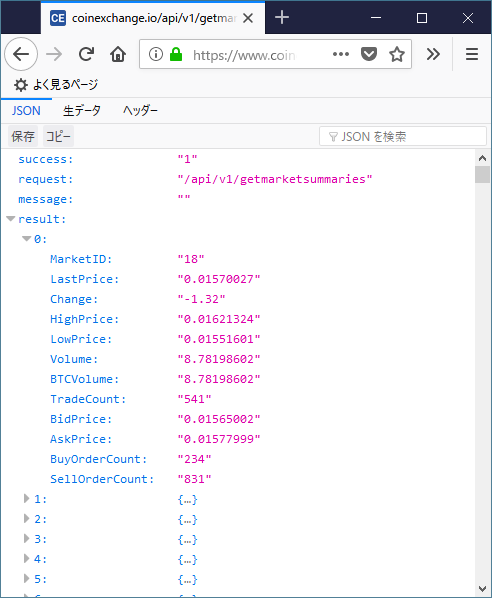
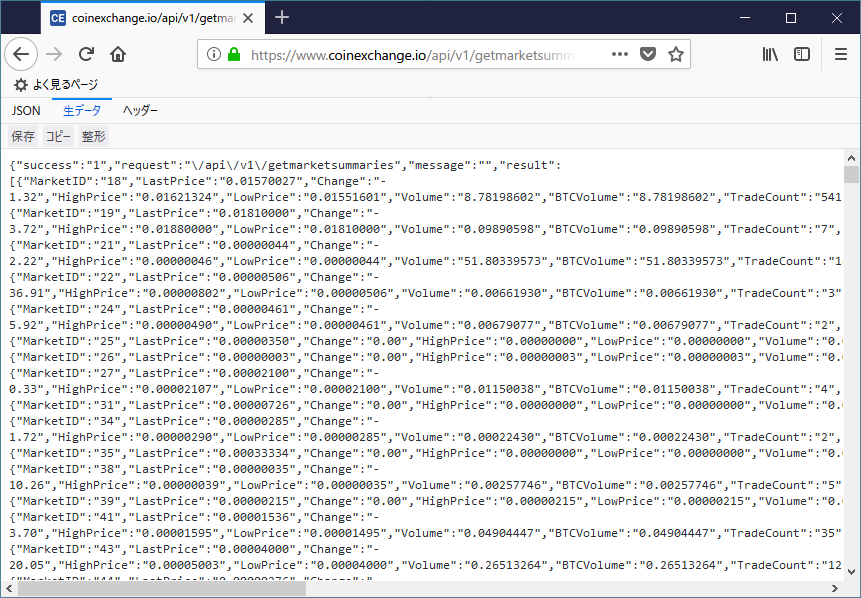
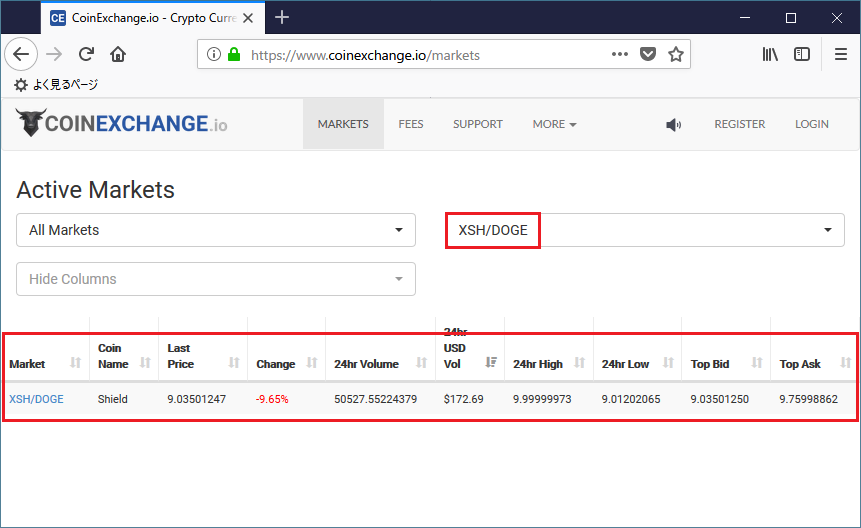
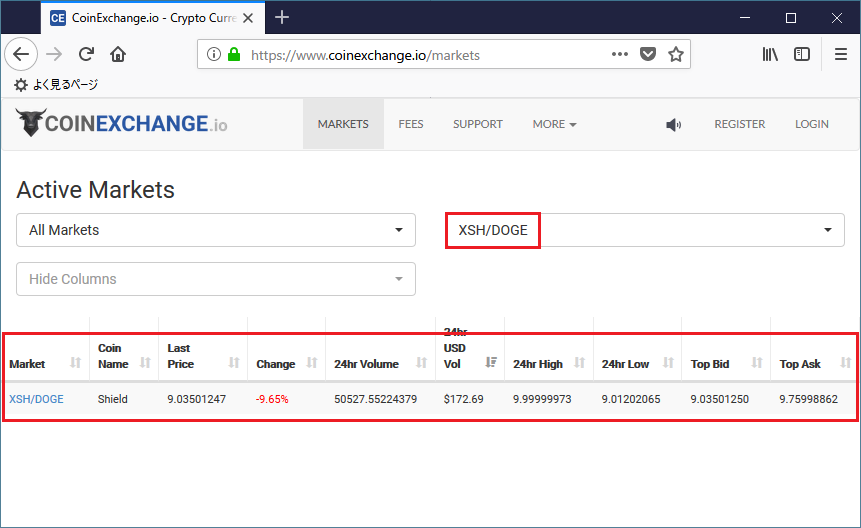
以下のスクリーンショットを見ると、同じ値が取得されているのが確認できます。
HTTPステータスなどを一緒に取得したい場合はInvoke-WebRequestが便利! †
上記では、Invoke-RestMethodにてJSONをPowerShellで扱いやすい状態に変換してくれますが、
Webサーバから返却された値を変換せずに取得したい場合は、Invoke-WebRequestコマンドレットを使用します。
また、取得後にJSONをPowerShellで扱いやすいオブジェクトに変換するには、ConvertFrom-Jsonコマンドレットを使用します。
以下に実行例を記します。
- セキュリティプロトコルをTLS1.2に変更します。(2018/5/31時点、TLS1.2を指定しないと動作しなくなったので追記)
PS C:\> [Net.ServicePointManager]::SecurityProtocol = [Net.SecurityProtocolType]::Tls12
- APIのURL作成用の文字列を変数に格納しています。
PS C:\> $base_url = "https://www.coinexchange.io/api/"
PS C:\> $version  = "v1"
PS C:\> $method   = "getmarketsummaries"
- Invoke-WebRequestコマンドレットでAPIを呼び出し返却された情報を変数に格納しています。
PS C:\> $response = Invoke-WebRequest -UseBasicParsing "${base_url}${version}/${method}"
- 返却された情報を表示してみます。
PS C:\> $response


StatusCode        : 200
StatusDescription : OK
Content           : {"success":"1","request":"\/api\/v1\/getmarketsummaries","message":"","result":[{"MarketID":"18","L
                    astPrice":"0.01582001","Change":"0.42","HighPrice":"0.01599963","LowPrice":"0.01562021","Volume":"4
                    .3...
RawContent        : HTTP/1.1 200 OK
                    Transfer-Encoding: chunked
                    Connection: keep-alive
                    x-frame-options: SAMEORIGIN
                    Cache-Control: no-cache
                    Content-Type: application/json
                    Date: Fri, 01 Jun 2018 15:22:18 GMT
                    Set-Cook...
Forms             :
Headers           : {[Transfer-Encoding, chunked], [Connection, keep-alive], [x-frame-options, SAMEORIGIN], [Cache-Cont
                    rol, no-cache]...}
Images            : {}
InputFields       : {}
Links             : {}
ParsedHtml        :
RawContentLength  : 183771
- HTTPステータスやContent-Typeを簡単に取得することができます。
PS C:\> $response.StatusCode
200

PS C:\> $response.Headers.'Content-Type'
application/json
- ConvertFrom-Jsonを使ってみます。
PS C:\> $json = ConvertFrom-Json($response.Content)
PS C:\> $json

success request                    message result
------- -------                    ------- ------
1       /api/v1/getmarketsummaries         {@{MarketID=18; LastPrice=0.01582001; Change=0.42; HighPrice=0.01599963; ...


PS C:\> $json.result[0]


MarketID       : 18
LastPrice      : 0.01582001
Change         : 0.42
HighPrice      : 0.01599963
LowPrice       : 0.01562021
Volume         : 4.32781232
BTCVolume      : 4.32781232
TradeCount     : 405
BidPrice       : 0.01583001
AskPrice       : 0.01590000
BuyOrderCount  : 248
SellOrderCount : 842
Webの応答を読み取っています。(Waiting for response)を非表示にする方法 †
上記のコマンドレットを実行すると、APIサーバとのやり取りのプログレスメッセージが表示されます。
これを非表示にしたい場合は、以下のようにしてください。
非表示にするには、$ProgressPreferenceにSilentlyContinueを設定します。
変更前は以下のように Continue が設定されています。
PS C:\> $ProgressPreference
Continue
非表示にするには、以下のように変更します。
PS C:\> $ProgressPreference = "SilentlyContinue"
以上、PowerShellを使って、coinexchang.io.html is not found or not readable.の getmarketsummariesとgetmarkets APIを使って
任意の通貨ペアのマーケット情報を取得する操作例でした。
CoinExchange.io
へのリンク
![[PukiWiki]](image/logo.png "[PukiWiki]")



 04.png
 03.png
 02.png
 01.png


