PowerShellで指定した通貨ペアの売買注文一覧を取得する・getorderbook †
getorderbook APIは、market_id(通貨ペア)を指定することにより売買注文一覧を取得することができます。
MarketIDの一覧は getmarkets APIで取得できます。
以下、getorderbook APIのPowerShellによる操作例を記します。
CoinExchange.io
へのリンク

追記 †
関連資料・記事 †
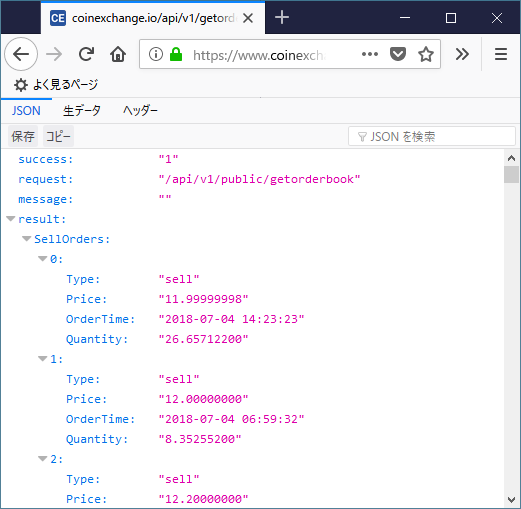
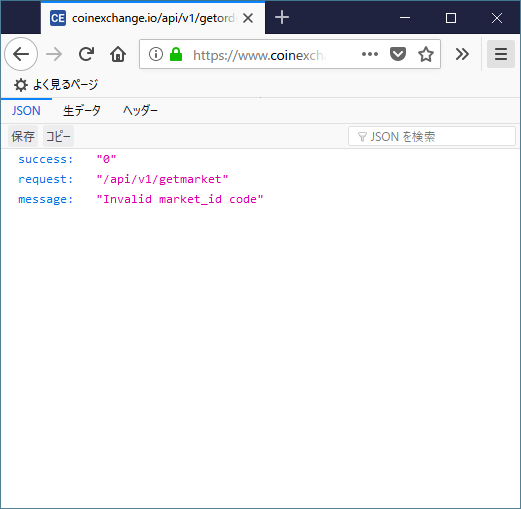
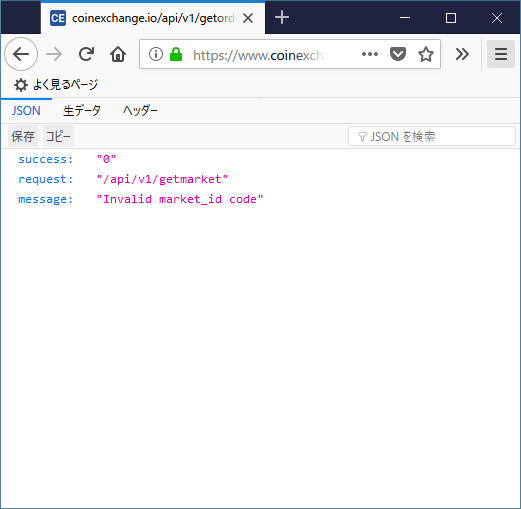
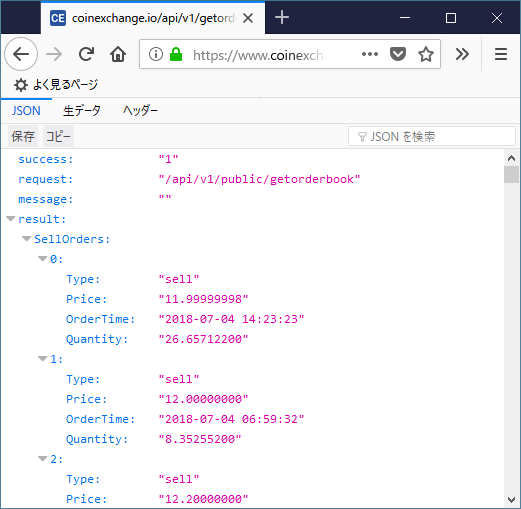
getorderbook APIをブラウザでアクセスしてみる †
以下のURLは、XSH/DOGEペアのサマリが表示されます。(2018/7/5確認)
getorderbookの仕様 †
以下、CoinExchange.io API v1 Reference からの抜粋です。
Get Order Book
 This endpoint retrieves the top 50 buy and sell order for the market.
HTTP Request
 GET https://www.coinexchange.io/api/v1/getorderbook?market_id=1
 Query Parameters
   Parameter Type   Description
   market_id string Determines which market summary data is returned, can be obtained from 'getmarkets’
'getorderbook’ JSON return:
{
   "success": "1",
   "request": "/api/v1/public/getorderbook",
   "message": "",
   "result":
{
   "SellOrders": [
   {
       "Type": "sell",
       "Price": "0.00928729",
       "OrderTime": "2016-02-12 03:43:53",
       "Quantity": "37.04860800"
   },
   {
       "Type": "sell",
       "Price": "0.00943025",
       "OrderTime": "2016-02-12 03:20:20",
       "Quantity": "37.98811700"
   },
   {
       "Type": "sell",
       "Price": "0.00946113",
       "OrderTime": "2016-02-12 03:13:08",
       "Quantity": "61.29427500"
   }
   ],
   "BuyOrders": [
   {
       "Type": "buy",
       "Price": "0.00855383",
       "OrderTime": "2016-02-12 03:35:51",
       "Quantity": "907.10057100"
   },
   {
       "Type": "buy",
       "Price": "0.00853751",
       "OrderTime": "2016-02-12 03:18:00",
       "Quantity": "86921.80244318"
   },
   {
       "Type": "buy",
       "Price": "0.00853596",
       "OrderTime": "2016-02-11 18:08:49",
       "Quantity": "487.45194800"
   }
   ]
}
market_idを取得する。 †
getorderbook APIにはmarket_idにMarketIDを指定しないと動作しません。
このMarketIDの一覧は getmarkets APIで取得できます。
以下、実際に取得する手順を記します。
- PowerSehllを起動します。
- セキュリティプロトコルをTLS1.2に指定します。
PS C:\> [Net.ServicePointManager]::SecurityProtocol = [Net.SecurityProtocolType]::Tls12
- market_id一覧を取得します。
PS C:\> $getmarkets_url = "https://www.coinexchange.io/api/v1/getmarkets"
PS C:\> $markets = Invoke-RestMethod -UseBasicParsing $getmarkets_url
- 変数$marketsにgetmarkets APIが返却した内容が格納されています。
PS C:\> $markets

success request            message result
------- -------            ------- ------
1       /api/v1/getmarkets         {@{MarketID=18; MarketAssetName=Litecoin; MarketAssetCode=LTC; MarketAssetID=2; M...

PS C:\> $markets.result.Count
846
849個の情報が格納されているのが確認できます。
一番最初の配列に格納されている情報を表示してみます。
PS C:\> $markets.result[0]

MarketID         : 18
MarketAssetName  : Litecoin
MarketAssetCode  : LTC
MarketAssetID    : 2
MarketAssetType  : currency
BaseCurrency     : Bitcoin
BaseCurrencyCode : BTC
BaseCurrencyID   : 1
Active           : True
先頭から10行表示してみます。
PS C:\> $markets.result | Format-Table | Select-Object -First 10

MarketID           MarketAssetName    MarketAssetCode    MarketAssetID      MarketAssetType    BaseCurrency       BaseCurrencyCode   BaseCurrencyID                Active
--------           ---------------    ---------------    -------------      ---------------    ------------       ----------------   --------------                ------
18                 Litecoin           LTC                2                  currency           Bitcoin            BTC                1                               True
19                 Unobtanium         UNO                3                  currency           Bitcoin            BTC                1                               True
20                 Syscoin            SYS                5                  currency           Bitcoin            BTC                1                              False
21                 Dogecoin           DOGE               4                  currency           Bitcoin            BTC                1                               True
22                 Kobocoin           KOBO               6                  currency           Bitcoin            BTC                1                               True
23                 Bitz               BITZ               7                  currency           Bitcoin            BTC                1                              False
24                 Digitalcoin        DGC                8                  currency           Bitcoin            BTC                1                               True
25                 Megacoin           MEC                9                  currency           Bitcoin            BTC                1                               True
一番左側にMarketIDが表示されています。
実際に、XVG(Verge)通貨ペアのMarketIDを検索した例が以下です。
PS C:\> $markets.result | Format-Table | Out-String -Stream | Select-String XVG

791      Verge                    XVG             589           currency        Bitcoin         BTC              1                True
792      Verge                    XVG             589           currency        Litecoin        LTC              2                True
793      Verge                    XVG             589           currency        Ethereum        ETH              70               True
794      Verge                    XVG             589           currency        Dogecoin        DOGE             4                True
以下、MarketID=791, XVG/BTCを対象にして記します。
MarketID一覧をCSV形式で取得したい場合は、以下の記事を参考にしてください。
MarketID一覧情報を取得する
getorderbook APIをPowerShellから操作する †
上記では、XVGのMarketID(market_id)を取得しました。
以下、XVG/BTC(market_id = 791)を使用して売買取引一覧を取得してみます。
- セキュリティプロトコルをTLS1.2に指定します。
[Net.ServicePointManager]::SecurityProtocol = [Net.SecurityProtocolType]::Tls12
- orderbook APIのURLおよびmarket_idを設定します。
$orderbook_url = "https://www.coinexchange.io/api/v1/getorderbook"
$market_id = 791
- getorderbook APIを呼び出します。
$orderbook = Invoke-RestMethod -UseBasicParsing "${orderbook_url}?market_id=${market_id}"
- 上記の構文を実行してみます。
PS C:\> [Net.ServicePointManager]::SecurityProtocol = [Net.SecurityProtocolType]::Tls12
PS C:\> $orderbook_url = "https://www.coinexchange.io/api/v1/getorderbook"
PS C:\> $market_id = 791
PS C:\> $orderbook = Invoke-RestMethod -UseBasicParsing "${orderbook_url}?market_id=${market_id}"
PS C:\> $orderbook

success request                     message result
------- -------                     ------- ------
1       /api/v1/public/getorderbook         @{SellOrders=System.Object[]; BuyOrders=System.Object[]}
- sell, buyの上位10行を表示してみます。
PS C:\> $orderbook.result.SellOrders | Select-Object -First 10

Type Price      OrderTime           Quantity
---- -----      ---------           --------
sell 0.00000405 2018-07-05 00:21:46 2491.19484204
sell 0.00000408 2018-07-05 00:02:31 302.90000000
sell 0.00000410 2018-07-04 23:44:47 6000.00000000
sell 0.00000413 2018-07-04 21:54:40 16.96901446
sell 0.00000413 2018-07-05 00:01:58 5000.00000000
sell 0.00000414 2018-07-04 06:21:53 10000.00000000
sell 0.00000420 2018-07-03 23:44:11 896.08864378
sell 0.00000420 2018-07-04 22:33:22 2621.55388471
sell 0.00000422 2018-07-04 04:03:53 100.00000000
sell 0.00000422 2018-07-04 07:24:15 100.00000000
PS C:\> $orderbook.result.BuyOrders | Select-Object -First 10

Type Price      OrderTime           Quantity
---- -----      ---------           --------
buy  0.00000395 2018-07-05 01:09:02 3687.49083418
buy  0.00000394 2018-07-05 00:09:24 380.25617005
buy  0.00000394 2018-07-05 00:18:18 3389.81976523
buy  0.00000394 2018-07-05 00:55:55 2533.72922970
buy  0.00000391 2018-07-05 00:47:41 1639.41443734
buy  0.00000389 2018-07-04 16:06:43 1135.11833548
buy  0.00000385 2018-07-05 00:43:20 2556.79145714
buy  0.00000384 2018-07-03 11:05:33 4389.48229167
buy  0.00000380 2018-07-04 04:54:14 1338.00000000
buy  0.00000380 2018-07-04 13:49:49 292.32401316
HTTPステータスなどを一緒に取得したい場合はInvoke-WebRequestが便利 †
上記では、Invoke-RestMethodにてJSONをPowerShellで扱いやすい状態に変換してくれますが、
Webサーバから返却された値を変換せずに取得したい場合は、Invoke-WebRequestコマンドレットを使用します。
また、取得後にJSONをPowerShellで扱いやすいオブジェクトに変換するには、ConvertFrom-Jsonコマンドレットを使用します。
以下に実行例を記します。
- Invoke-WebRequestコマンドレットでAPIを呼び出し、情報を取得する
PS C:\> [Net.ServicePointManager]::SecurityProtocol = [Net.SecurityProtocolType]::Tls12
PS C:\> $orderbook_url = "https://www.coinexchange.io/api/v1/getorderbook"
PS C:\> $market_id = 791
PS C:\> $response = Invoke-WebRequest -UseBasicParsing "${orderbook_url}?market_id=${market_id}"
PS C:\> $response

StatusCode        : 200
StatusDescription : OK
Content           : {"success":"1","request":"\/api\/v1\/public\/getorderbook","message":"","result":{"SellOrders":[{"Type":"sell","Price":"0.00000405","OrderTime":"2018-07-05 00:21:
                    46","Quantity":"2491.19484204"},{"Type...
RawContent        : HTTP/1.1 200 OK
                    Transfer-Encoding: chunked
                    Connection: keep-alive
                    x-frame-options: SAMEORIGIN
                    Cache-Control: no-cache
                    Content-Type: application/json
                    Date: Thu, 05 Jul 2018 01:19:11 GMT
                    Set-Cook...
Forms             :
Headers           : {[Transfer-Encoding, chunked], [Connection, keep-alive], [x-frame-options, SAMEORIGIN], [Cache-Control, no-cache]...}
Images            : {}
InputFields       : {}
Links             : {}
ParsedHtml        :
RawContentLength  : 9794
- 各種HTTPの情報が簡単に取得できます。
PS C:\> $response.StatusCode
200
PS C:\> $response.Headers.'Content-Type'
application/json
- ConvertFrom-Jsonを使うとContentの内容をInvoke-RestMethodのresultと同様にできます。
PS C:\> $json = ConvertFrom-Json($response.Content)
PS C:\> $json

success request                     message result
------- -------                     ------- ------
1       /api/v1/public/getorderbook         @{SellOrders=System.Object[]; BuyOrders=System.Object[]}

PS C:\> $json.result

SellOrders
----------
{@{Type=sell; Price=0.00000405; OrderTime=2018-07-05 00:21:46; Quantity=2491.19484204}, @{Type=sell; Price=0.00000408; OrderTime=2018-07-05 00:02:31; Quantity=302.90000000}, @{Typ...
Webの応答を読み取っています。(Waiting for response)を非表示にする方法 †
上記のコマンドレットを実行すると、APIサーバとのやり取りのプログレスメッセージが表示されます。
これを非表示にしたい場合は、以下のようにしてください。
非表示にするには、$ProgressPreferenceにSilentlyContinueを設定します。
変更前は以下のように Continue が設定されています。
PS C:\> $ProgressPreference
Continue
非表示にするには、以下のように変更します。
PS C:\> $ProgressPreference = "SilentlyContinue"
以上、PowerShellを使って、CoinExchange.io
の getorderbook APIを使って
売買一覧情報を取得する操作例でした。
CoinExchange.io
へのリンク
![[PukiWiki]](image/logo.png "[PukiWiki]")



 03.png
 02.png
 01.png

